Posts

Error and solution, or solution.

1. Change ffmpeg verson ttps://askubuntu.com/posts/1267208/edit ffmpeg -i input.mp4 \            -c:v libtheora -qscale:v 6 -c:a libvorbis -qscale:a 5 \            output.ogv 2. install the latest version of JSON https://stackoverflow.com/questions/70376623/create-react-app-says-create-react-app-requires-node-14-or-higher-fixing-node 3. Initialize the reacts js project. npx create-react-app my-app cd my-app npm start 4. why the amazon skill is not allowing consecutive commands? because in the lambda function assigned to the intent handler, you have to code to allow consecutive commands, otherwise you have to start the amazon skill and do it.
python -m SimpleHTTPServer /usr/bin/python: No module named SimpleHTTPServer

 use  python3 -m http.server 9000

Postman collection accidentally deleted

 Got to trash or  go to history which is located on the side bar below collection, find your requests and save it.

adb not found

 this problem arise during using of the tablet as pen tab. I use the software slide.jar It was complaining about this error. Soln: sudo apt install adb.

Exception in thread "main" java.lang.UnsatisfiedLinkError: Can't load library: /usr/lib/jvm/java-11-openjdk-amd64/lib/libawt_xawt.so

sudo apt install openjdk-11-jdk  https://exerror.com/exception-java-lang-unsatisfiedlinkerror-cant-load-library-usr-lib-jvm-java-11-openjdk-amd64-lib-libawt_xawt-so/

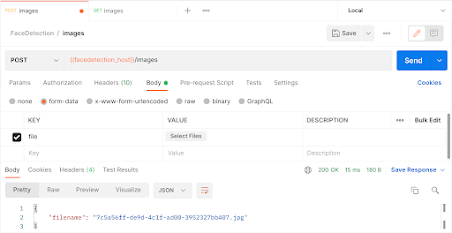
POSTMAN image sending error.

Image
Send image via the form-data, not from the raw binary https://stackoverflow.com/questions/62798421/how-to-send-file-to-fastapi-endpoint-using-postman

AWS-Command

Configure aws credential aws configure Get I am user: aws iam get-user Create a bucket: aws s3 mb s3://bucketname Get a java function: sam init --location gh:symphoniacloud/sam-init-HelloWorldLambdaJava sam init --location gh:symphoniacloud/sam-init-HelloWorldLambdaJava-zip Deploy in AWS Lambda: sam deploy --s3-bucket $CF_BUCKET --stack-name HelloWorldLambdaJava --capabilities CAPABILITY_IAM Inovke lambda function aws lambda invoke --invocation-type RequestResponse --function-name HelloWorldJava --payload \"world\" outputfile.txt Invoke lambda function with invocation type aws lambda invoke --invocation-type Event --function-name HelloWorldJava --payload \"world\" outputfile.txt Delete the lambda: aws cloudformation delete-stack --stack-name HelloWorldLambda View the cloudformation of particular stack: aws cloudformation list-stack-resources --stack-name chapter4-sam View the format of input or output in aws services(in this case s3): sam local generate-event s3 del...

Issue: Openwhisk

Image
Error: {     "error": "An error has occurred: Error: Invalid constructor options. Missing api_key parameter or token plugin." } Steps to reproduce: 1. create js program proxy.js var openwhisk = require('openwhisk'); function main(params) {         if(params.password !== "secret") {                 throw new Error("Passoword incorrect");         }          var ow = openwhisk(); // not passing any value to constructor will result in error.         return {"status":"Logged in"}; } 2. Deploy:  wsk action create proxy proxy.js 3. invoke wsk action invoke proxy -p password secret --result Solution: 1. install openwhisk with npm package manager npm install openwhisk 2. pass parameter to openwhisk():                  var openwhisk = require('openwhisk'); function main(params) {         if(para...

Install virtual env in linux

 https://gist.github.com/Geoyi/d9fab4f609e9f75941946be45000632b # How to install virtualenv: ### Install **pip** first sudo apt-get install python3-pip ### Then install **virtualenv** using pip3 sudo pip3 install virtualenv ### Now create a virtual environment virtualenv venv >you can use any name insted of **venv** ### You can also use a Python interpreter of your choice virtualenv -p /usr/bin/python2.7 venv ### Active your virtual environment: source venv/bin/activate ### Using fish shell: source venv/bin/activate.fish ### To deactivate: deactivate ### Create virtualenv using Python3 virtualenv -p python3 myenv ### Instead of using virtualenv you can use this command in Python3 python3 -m venv myenv

Window search error

Don't search on all tab. You can find app, document,setting. Click on app then search

Eclipse Errors

1. Collapse symbol on the left side vanish. Cannot collapse anymore. To toggle the collapse enable/disable. [ctrl + /]. / from numpad.

OpenWhisk In linux

## Contents - [Local Environment](#local-environment) - [WSK CLI](#wsk-cli) - [Deploy Python Action](python-action) - [Deploy Java Action](java-action) - [Deploy JS API](deploy-js-api) - [Deploy Python API](deploy-python-api) - [Deploy Java API](deploy-java-api) ## Local Environment Download open whisk for local environment: This program runs on the local environment as docker. `Docker, NPM and java` should be installed to run this environment. Set up the runtime environment for running the application. installing the gradle in the local computer will set up all the required environment for the computer. ### a) Install gradle in local computer: ``` sudo apt install gradle ``` ### b) download openwhisk app for running locally via git git clone https://github.com/apache/openwhisk.git ### c) run app in the local environment: ``` sudo ./gradlew core:standalone:bootRun ``` ### d) set the wsk property for wsk commands, this line will be available on the same terminal where the ...

JAVA_HOME not found in linux

  The JAVA_HOME environment variable is not defined correctly This environment variable is needed to run this program NB: JAVA_HOME should point to a JDK not a JRE. Commands: nano etc/profile export JAVA_HOME="/usr/lib/jvm/jdk1.8.0_311" export PATH=$PATH:$JAVA_HOME/bin export JAVA_HOME=/usr/lib/jvm/jdk1.8.0_311 sudo gedit /etc/environment Add "JAVA_HOME="/usr/lib/jvm/java-8-openjdk-amd64"" to /etc/environment Description of command:  1) This is the place to give the variable JAVA_HOME the value of the jdk.  JDK from oracle is preferred.  After editing the file, laptop should restart, so that the value will be set. 2, 3)  This two line should be added.  When we give this JAVA_HOME a path, this path will be global variable all around the Linux. 4) If after this also there is error:  give 4th command to terminal: We need to update in other places as well. 5,6). We need to update in environment variable as well. Remark: This folder 'jdk1.8.0_311' is do...

OpenWhisk - Thumbnail application

 1. Commands ./gradlew core:standalone:bootRun sudo docker ps wsk property set --apihost 'http://172.17.0.1:3233' --auth '23bc46b1-71f6-4ed5-8c54-816aa4f8c502:123zO3xZCLrMN6v2BKK1dXYFpXlPkccOFqm12CdAsMgRU4VrNZ9lyGVCGuMDGIwP' wsk action invoke action1 --blocking --param name Himal wsk action invoke action1 --blocking wsk action update action1 action1.js  wsk activation get e1440027233f40f5840027233f40f588 wsk action invoke action1 wsk action create action1 action1.js wsk namespace list wsk action list

Eclipse Shortcut

Shortc ut for terminating running application in eclipse is not working. I think you are looking for this: Go to Properties -> General -> Keys Look for "Stop" in my case there are 3, use the one under Category "Launch Bar". Assign your hotkey and set "In Windows" under the "When" option and apply. This terminates the running process, even if the hotkey is called "Stop", wich is somewhat confusing, since there is another hotkey called "Terminate". Regards! ref:   https://stackoverflow.com/questions/17803365/eclipse-terminate-keyboard-shortcut

aws lambda udemy

1) Commands:  Surface sls deploy serverless config credentials -o --provider aws --key ${key} --secret ${secretkey} sls create --template aws-python --path hello-world-python sudo npm install -g serveless sls invoke -f hello -l sls deploy function -f hello sudo npm install -g serverless sudo apt install npm sls log -f hello -t  sls remove A Little Deep sls create --template aws-java-maven --path java-maven-example sls create --template aws-nodejs --path nodejs-example 2) Links: serverless documentation Java CRUD api using lambda&serverless github 3) Notes: 4) serverless.yml provider : name : aws runtime : python3.9 lambdaHashingVersion : 20201221 profile : serverless-admin region : us-east-1 memory-size : 128 timeout : 2 iamRoleStatements : - Effect : "Allow" Action : - "lambda:*" Resource : - "*" functions : hello-short-timeout : handler : handler.hello hello-long-timeout : handler : handler....

AWS provider credentials not found. Learn how to set up AWS provider credentials in our docs here.

 Serverless aws error: This is because the credentials is saved under the profile in local computer. Command to set up with profile was: serverless config credentials -o --provider aws --key AKIA3LZR3EC2QRRONTGF --secret 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 --profile serverless-admin This doesnot work when we deploy it with serverless command: serverless deploy WE need to give the credential for whole laptop, so the profile should be removed. serverless config credentials -o --provider aws --key AKIA3LZR3EC2QRRONTGF --secret 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 Just above command will work fine.   REF:  https://stackoverflow.com/questions/46128469/aws-lambda-serverless-deploy-asking-for-aws-provider-credentials

swagger not showing view in spring fox 3

 http://localhost:8000/v2/api-docs This above link should be put in search box and searcn in the below link http://localhost:8000/swagger-ui/index.html First: Enter http://localhost:8000/swagger-ui/index.html Second: Enter  http://localhost:8000/v2/api-docs this search box of above page Third: Search

cannot resolve configuration properties in intellij

 Rename the configuration file to spring-configuration-metadata.json This is because spring automatically name the files as additional-spring-configuration-metadata.json

Java not detecting in visual studio code

Image
Manually download the jdk and give the path. JDK installed through apt-get will not work as it download only jre. JDK includes jre but jre do not include jdk go to setting in visual studio, search java.home. You will find a Java:Home click in edit in settings.json Enter the java home value in the file